Templates
TypesDiagram types
AI ERD Generator from Description
Describe entities and relationships. Get a Mermaid ERD with keys and cardinality.
Try one of these — click to open in the generator
Blog database schema: users (id, email, name, created_at), posts (id, user_id FK, title, body, published_at), comments (id, post_id FK, user_id FK, body, created_at). A user can write many posts. A post has many comments. A user can leave many comments.
Try it →Multi-tenant SaaS: organizations (id, name, plan), users (id, org_id FK, email, role), workspaces (id, org_id FK, name), documents (id, workspace_id FK, author_id FK, title, content). Each organization has many users and workspaces. Each workspace has many documents. Users author many documents.
Try it →E-commerce schema: customers (id, email), products (id, sku, name, price), orders (id, customer_id FK, total, status, placed_at), order_items (id, order_id FK, product_id FK, quantity, unit_price). Customer places many orders. Each order has many line items. Each item references one product.
Try it →Product analytics schema: users (id, anonymous_id, identified_at), events (id, user_id FK, name, timestamp, properties json), sessions (id, user_id FK, started_at, ended_at, device), page_views (id, session_id FK, url, referrer, duration_ms).
Try it →When to use AI ERD Generator from Description
New schema design
Before you write the first migration, sketch tables, columns, and relationships. An ERD lets the whole team argue about naming and cardinality on one canvas instead of over five Slack threads.
Migration & refactor planning
Splitting one users table into users + profiles + preferences? Annotate which columns move where. An ERD makes the before/after obvious, and reviewers can spot broken foreign keys in seconds.
Onboarding & architecture docs
New engineers need to know 'where does the money live'. An ERD in the README, next to migration files, is the fastest way to answer 'which table joins to which' without paging through 40 model files.
Audit & compliance review
SOC2, HIPAA, GDPR reviewers ask 'where is PII stored, and how does it flow?'. An ERD with PII columns annotated is a one-page answer that beats a spreadsheet of every field.
Normalization & performance review
Denormalize for read speed? Add a materialized join table? An ERD helps you argue trade-offs visually — you can see the 3rd normal form vs the denormalized version side by side.
Building an ERD in chat mode, from one vague sentence
An ERD generator working from a one-line description has to guess every cardinality you left out — one-to-many or many-to-many, join table or foreign key, nullable or not. Chat mode asks about the one cardinality that changes the shape of the schema, drafts the rest, and then lists what it made up so you can strike anything wrong. Here is the schema behind an applicant tracking system, built from a deliberately vague opening line.
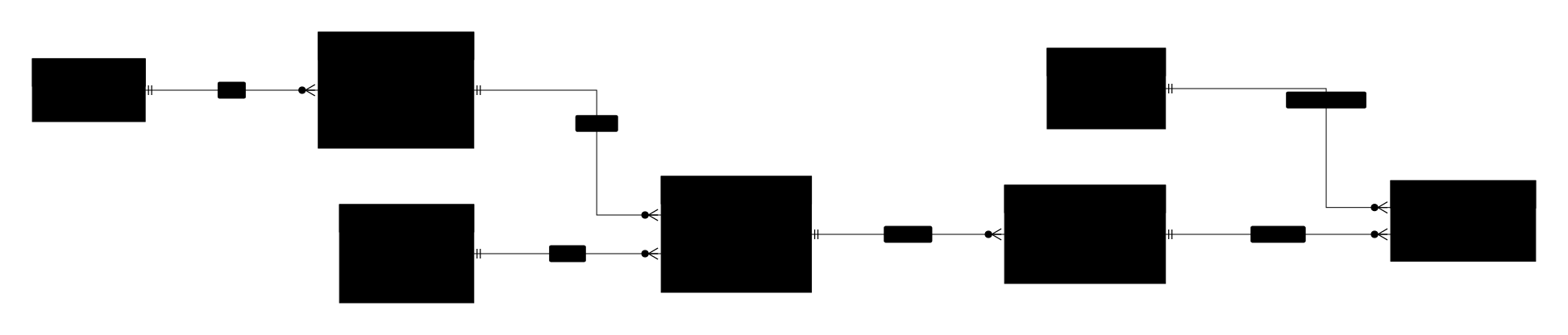
- Added a DEPARTMENT entity and hung job.department_id off it
- Made an interview a panel — several interviewers, each filing their own scorecard, hence INTERVIEW_PANELIST
- Gave APPLICATION a stage column (screening / onsite / offer / rejected)
- Added created_at on CANDIDATE, JOB and APPLICATION
- Typed every primary key as bigint, with foreign keys matching
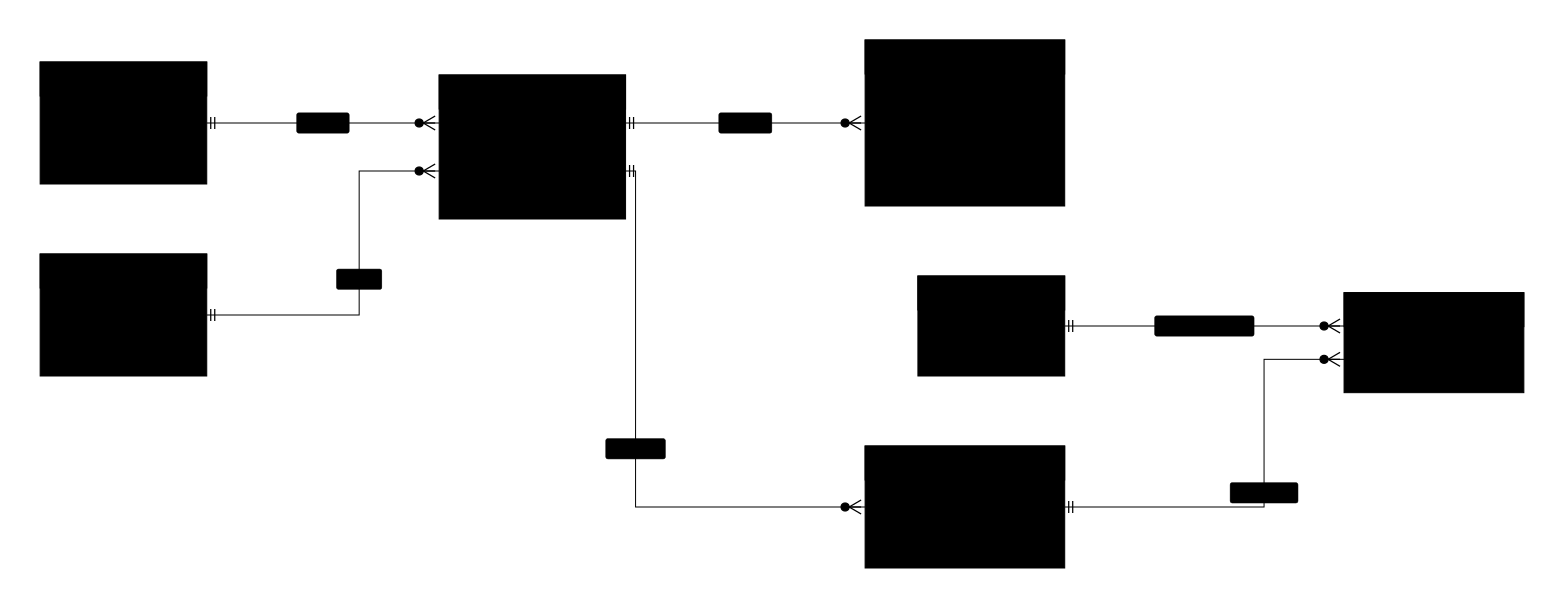
Four messages produced two join tables, an application row you can have more than one of per candidate-job pair, and a versioned offer — none of which were in "draw the database for our hiring tool". Sent one-shot, the same line gets you candidate.job_id, one interviewer per interview, and a created_at on every table you would then strip by hand.
Deep dive
Entity relationship diagrams (ERDs) are how you communicate a database schema without dumping raw DDL on the reader. They show entities as tables, their columns with types, primary and foreign keys, and — critically — the cardinality of relationships (one-to-one, one-to-many, many-to-many).
Reach for an ERD when you're designing a new schema before writing migrations, when you're onboarding an engineer to an existing codebase, or when you're writing an architecture doc that needs to justify why the data model looks the way it does. They're also invaluable when planning a migration or refactor — you can annotate which tables are being consolidated or split. If what you're describing is an object model rather than a set of tables, a class diagram is the closer fit.
Mermaid's erDiagram syntax uses crow's foot notation and supports column types, PK/FK markers, and relationship labels, which makes it detailed enough for real design docs. Where it falls short: it doesn't show indexes, constraints beyond keys, or physical storage details. For those, a full modeling tool like dbdiagram.io or an ORM's schema visualization tool goes deeper — but for the 90% of "let's talk about the shape of this data" conversations, an ERD in plain text you can commit alongside your migration files is exactly right.
Ready to try it yourself?
Frequently asked questions
How does the ERD generator work from a description?
You describe entities and their relationships in plain English — for example, 'users write posts, posts have many comments, users can leave comments' — and the AI generates a Mermaid ER diagram with entities, primary keys, foreign keys, and cardinality (1:1, 1:N, M:N). No need to learn ERD syntax or open a schema design tool.What information does the AI infer for each entity?
The AI infers columns from context. When you mention 'users have email and password', those become columns; when you say 'posts have many comments', a foreign key `post_id` is added to comments. Primary keys default to `id BIGINT`; timestamps like `created_at` and `updated_at` are added automatically if you use words like 'audit' or 'timestamped'. Types are inferred by name (`email` → varchar, `price` → decimal, `is_active` → boolean).Can I model many-to-many relationships and junction tables?
Yes. Describe it naturally: 'users can favorite posts' or 'tags belong to many posts, posts have many tags'. The AI adds the junction table with composite primary key and foreign keys back to both sides. You can also spell it out explicitly — 'add a favorites table with user_id and post_id' — and the AI honors the exact shape.How do I export the ERD for my migration doc or PR?
Export as SVG or PNG from the preview status bar. SVG works well in docs, README files, and Confluence — the diagram scales cleanly and its text is searchable. PNG is easier for Slack, Notion, and email. The underlying Mermaid source can also be copied and pasted into any Mermaid-compatible renderer (GitHub markdown, Notion, Obsidian) so it stays in sync with your codebase.Does the ERD support inheritance, polymorphism, or STI?
Mermaid ER syntax doesn't have native inheritance arrows, but the AI models these patterns pragmatically: single-table inheritance becomes one table with a `type` discriminator column; class-table inheritance becomes a parent table plus per-subtype child tables with FK back. Polymorphic associations show as two nullable FK columns with a `type` string. If you want strict UML class semantics instead, use the class diagram generator.Is the ERD generator free? Any signup needed?
Quick mode is free with no signup, watermark, or credit card; a per-IP daily rate limit prevents abuse. Chat mode is also free but requires a Google account so it can keep conversation context. Enterprise or higher-volume use cases that need dedicated capacity can reach out via the contact page.
Prefer a conversation?
Not sure how to phrase your prompt? Chat mode lets AI ask 2-3 clarifying questions about actors, events, and edge cases — then draws.
Want to draw better diagrams?
Read our in-depth tutorials — symbols, structures, 9 rules, and copy-paste prompt templates for real-world flows.
Related tools
Describe classes, attributes, and inheritance. Get a Mermaid UML class diagram.
Describe a process in plain English. Get a diagram. Export SVG or PNG.
Describe a topic hierarchy. Get a Mermaid mindmap with nested branches.