Templates
TypesDiagram types
AI Sequence Diagram from Description
Turn an API description into a sequence diagram with actors and arrows.
Try one of these — click to open in the generator
OAuth 2.0 authorization code flow: user clicks login on client app, redirected to auth server, logs in and consents, auth server returns authorization code to client via redirect, client exchanges code + secret for access token, uses token to call resource server API.
Try it →Stripe checkout flow: frontend creates payment intent via backend, backend calls Stripe API, Stripe returns client secret, frontend confirms payment on Stripe's side, Stripe sends webhook to backend on success, backend fulfills order and notifies frontend via WebSocket.
Try it →Saga pattern: order service creates order (pending), publishes event, payment service charges card and publishes result event, on success inventory service reserves stock, on failure payment service compensates by refunding. Order service listens for all events to finalize state.
Try it →WebSocket chat message: client A sends message via WebSocket to server, server persists to database, server pushes message to client B (recipient) over their WebSocket, client B sends read receipt back, server updates message status and notifies client A.
Try it →When to use AI Sequence Diagram from Description
API integration docs
When your REST or GraphQL API has multiple endpoints calling each other — auth, rate limiting, retries, webhooks. Sequence diagrams make every call traceable: who hit what, in what order, with what response.
Authentication & authorization handshakes
OAuth 2.0, SAML, JWT refresh, WebAuthn — any protocol where multiple parties exchange signed tokens. A sequence diagram forces you to name each actor and every message. Ideal for security review docs.
Distributed system message flows
Microservice choreography, event-driven pipelines, message queues (Kafka / RabbitMQ), WebSocket / SSE push. When there's no single orchestrator, a sequence diagram shows which service publishes what and who consumes it.
Database transactions & locking
Multi-step transactions with read/write locks, optimistic concurrency, two-phase commit. Sequence diagrams clarify the exact order of BEGIN, SELECT FOR UPDATE, INSERT, COMMIT — and what happens on lock timeout.
Event-driven architectures
Domain events fan out to subscribers, sagas coordinate long-running workflows, CQRS commands trigger event streams. A sequence diagram is often clearer than tracing spans when you want the whole story on one page.
Building a sequence diagram from a description that says almost nothing
A one-line prompt gets you arrows, but the model has to guess every actor you didn't name and every failure path you didn't mention. Chat mode asks about the one thing that reorders the arrows, drafts the rest, and then tells you which actors it invented. Here is a mobile access-token refresh flow, built from an opening line that says almost nothing.
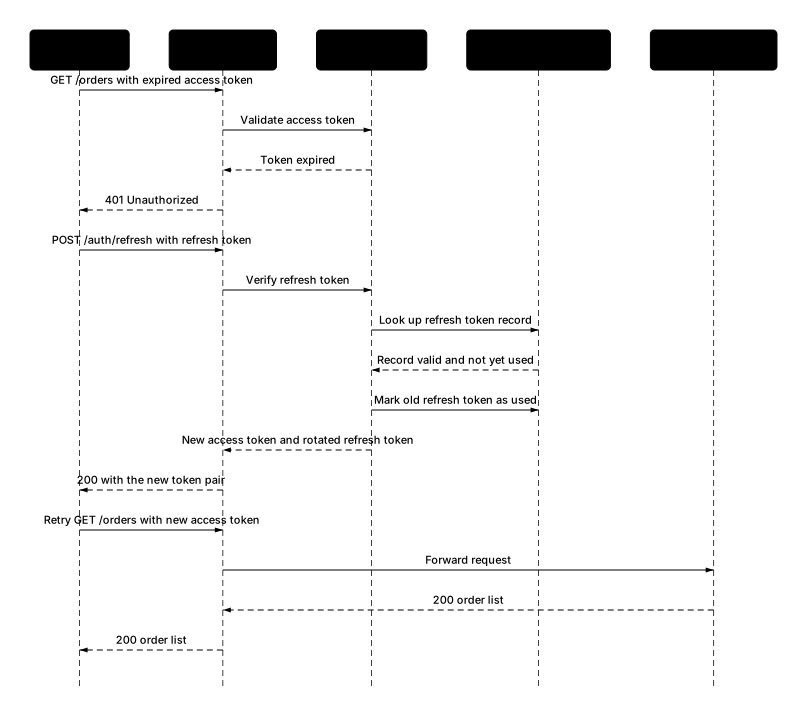
- Rotated the refresh token on every refresh — a used one is never valid again
- Routed every call through an API gateway instead of letting the app hit services directly
- Added a Redis token store behind the auth service to hold refresh token records
- Used GET /orders as a stand-in for the request that hit the 401
- Drew requests as solid arrows and responses as dashed async ones
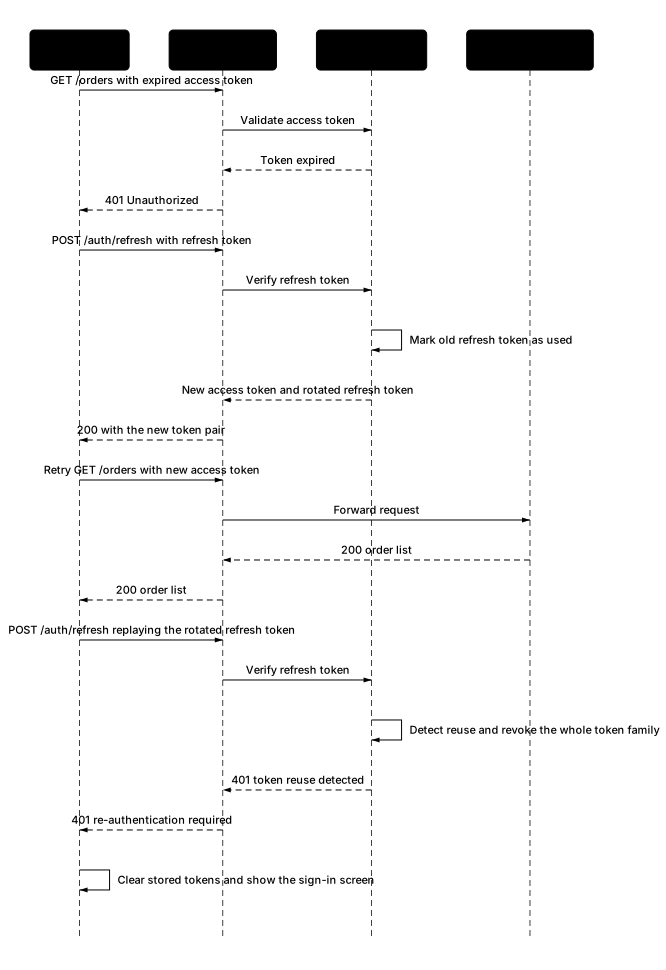
Four messages produced a sequence diagram with 401-triggered refresh, refresh token rotation, a retry of the original request, and a reuse-detection path that revokes the family — none of which were in the opening line. Sent one-shot, the same sentence would have drawn one client, one server, and a happy path, and you would have been the one to notice the replay case was missing.
Deep dive
Sequence diagrams are the sharpest tool when the story is about ordering and timing between multiple actors. Reach for them any time you need to show "who calls whom, in what order, with what response" — API integrations, authentication handshakes (OAuth, SAML, JWT refresh), distributed system message flows, database transactions with locks, WebSocket / SSE push patterns.
They're the go-to for engineering docs because they force you to name each actor explicitly — you can't hand-wave "the backend does something." Every arrow has a source, a target, and a message. This makes them ideal for architecture review docs and RFCs where the reader will pick apart every interaction.
A rough rule: if you find yourself saying "and then, and then, and then" more than three times in your explanation, you want a sequence diagram, not a flowchart. Sequence diagrams excel with async messages, activation bars showing when an actor is doing work, and notes annotating why a particular arrow matters. They struggle when the interaction is truly parallel with no meaningful ordering — in that case, a component diagram fits better.
Ready to try it yourself?
Prefer a conversation?
Not sure how to phrase your prompt? Chat mode lets AI ask 2-3 clarifying questions about actors, events, and edge cases — then draws.
Want to draw better diagrams?
Read our in-depth tutorials — symbols, structures, 9 rules, and copy-paste prompt templates for real-world flows.
Related tools
Describe classes, attributes, and inheritance. Get a Mermaid UML class diagram.
Describe a process in plain English. Get a diagram. Export SVG or PNG.
Describe a state machine. Get a Mermaid state diagram with transitions.