Templates
TypesDiagram types
Text to Mind Map Generator
Describe a topic hierarchy. Get a Mermaid mindmap with nested branches.
Try one of these — click to open in the generator
Mindmap for a product launch: Marketing (SEO, ads, social, PR, email), Engineering (backend, frontend, mobile, infra), Ops (support, billing, legal, compliance), Analytics (dashboards, funnels, cohort tracking). Add 2-3 leaves per branch.
Try it →Mindmap of software architecture concerns for a new SaaS: Reliability (SLO, monitoring, incident response), Scalability (caching, sharding, queues), Security (auth, secrets, audit), Cost (compute, egress, storage), DX (docs, dev env, CI speed).
Try it →Mindmap for senior software engineer interview prep: System design (databases, caching, queues, sharding, CDN, load balancing), Algorithms (arrays, trees, graphs, DP, greedy), Behavioral (leadership, conflict, growth), Domain knowledge (whatever the target company builds).
Try it →Mindmap of weekend project ideas: Learning (build a compiler, a database, a shell), Tools (workflow automation, dev productivity), Games (chess AI, roguelike, tower defense), Data (personal analytics, habit tracker, dashboards). Include estimated weekend count for each.
Try it →When to use Text to Mind Map Generator
Brainstorming & ideation
Kickoff meetings, feature ideation, whiteboarding a new product. Mindmaps capture divergent thinking better than lists — you can see the shape of what you know and what you're missing.
Feature & release planning
Break a big theme into workstreams. Marketing / engineering / support / analytics each get a branch, and every leaf is a concrete deliverable. A mindmap makes gaps visually obvious.
Research & competitive analysis
Sizing up a new market? Every competitor gets a node, every dimension (pricing / features / integrations / audience) gets a sub-branch. Faster than a spreadsheet for the exploration phase.
Meeting notes & recap
During a discussion, capturing topics as a mindmap lets you jump between threads without losing where each was going. Post-meeting, the mindmap is easier to skim than linear notes.
Product vision & strategy docs
The one-pager 'what is this company / product'. A mindmap forces you to be concrete about pillars, principles, and non-goals. Better than a wall of paragraphs.
Using the text to mind map generator in chat mode, from one vague sentence
A one-line prompt gets you a mind map, but it has to guess the thing that matters most — what the top level is organised by. Guess wrong and every node has to move, so that is the one thing chat mode asks about. It fills in the rest, then lists what it added. Here is a quarterly content plan, built from a deliberately vague opening line.
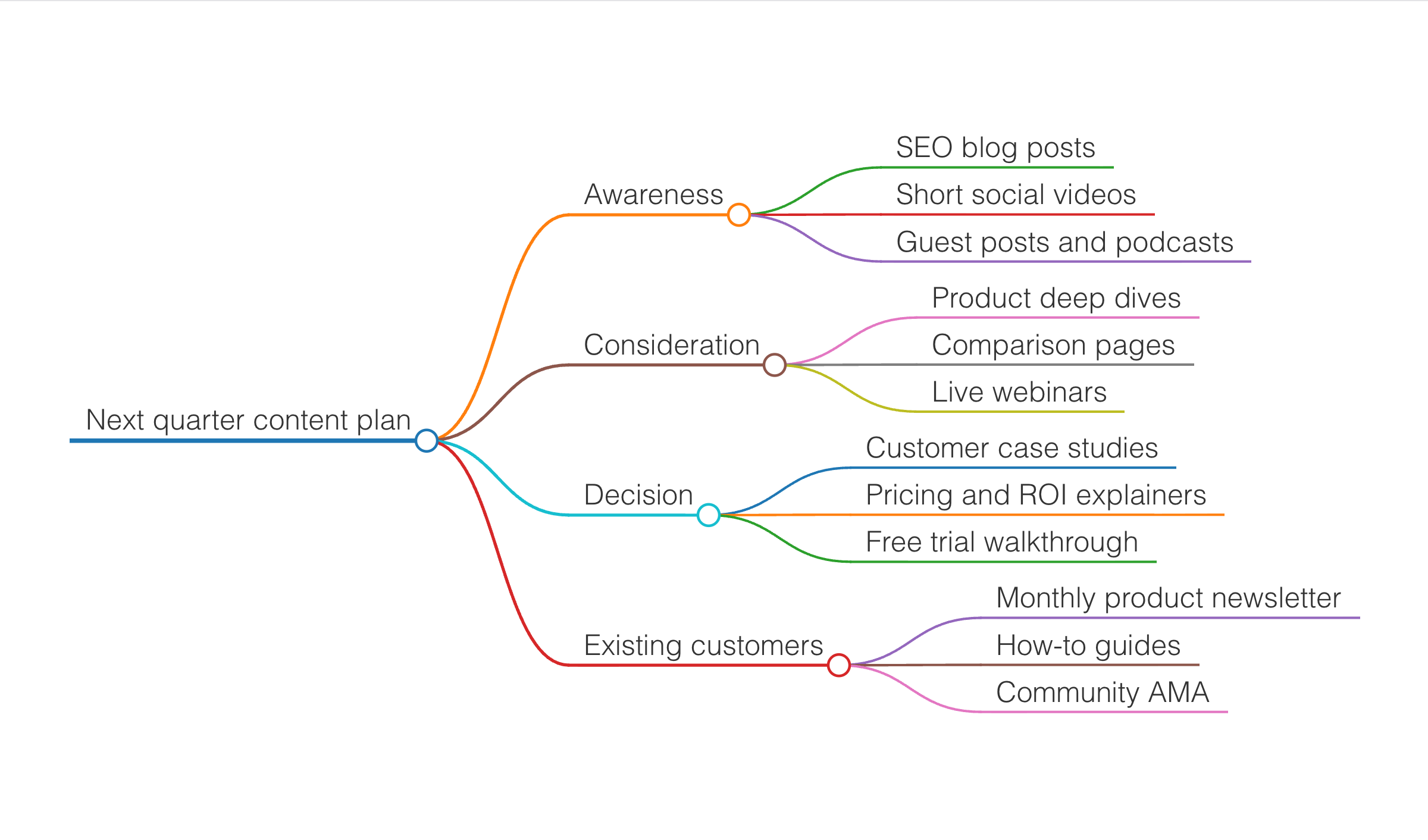
- Added a fourth branch for existing customers — you mentioned the funnel, not who is already in it
- Added "Comparison pages" under Consideration
- Added a "Community AMA" under Existing customers
- Kept every branch to three items so the map stays readable
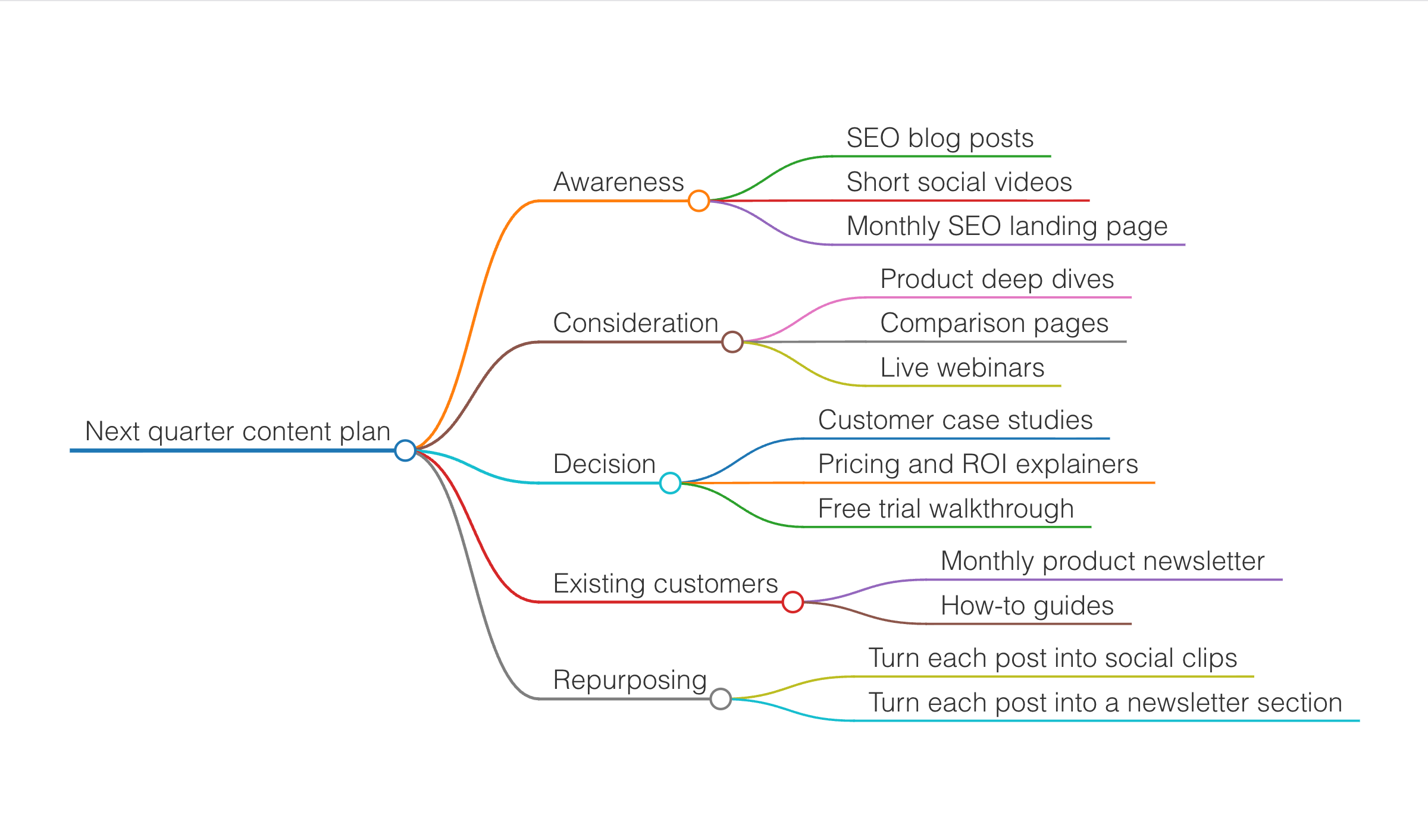
Three messages produced a plan organised by funnel stage, with a branch for existing customers and one for repurposing — none of it in the opening line. The top level is the expensive part: a text to mind map generator that guesses channel instead of funnel hands you a tree where every leaf sits under the wrong parent, and moving them back is most of the work.
Deep dive
A text to mind map generator is the visual thinking tool for when you're trying to make an unstructured brain-dump legible. Reach for it at the earliest stage of planning any complex topic — before you have a real hierarchy, before you know which concerns are top-level, before an actual outline exists. Feed it a raw topic and let the AI-generated mind map surface the branches you had not yet named.
Their strength is asymmetric: the tree structure is stronger than a bullet list at showing which ideas are peers and which are children, but weaker than a flowchart at showing sequence, and weaker than a state diagram at showing rules. So use them when the "shape" of the ideas is the useful thing — during brainstorming, in interview scoping (junior engineers reason better with mindmaps than with prose), and when you're capturing the outline of a design doc before you commit to a structure.
Mermaid's mindmap syntax uses indentation for hierarchy and supports different node shapes (rectangles, rounded, hexagons, circles) for visual distinction. It's intentionally spare compared to dedicated mindmap tools like XMind or MindMeister — no icons, no rich formatting, no drag-to-reorganize. That's the tradeoff for keeping it in plain text you can commit alongside code.
Ready to try it yourself?
Frequently asked questions
How does the text to mind map generator work?
You give the AI a topic — a subject you want to study, a project you're planning, a book you're outlining — and it returns a structured mind map with a root topic and 3-5 branches, each with sub-branches 2-3 levels deep. Under the hood we route your prompt through an LLM tuned for hierarchical thinking; the model outputs markmap markdown (indented `#` levels), and the browser renders it into an interactive canvas you can fold, pan, and zoom.What kinds of topics work well as mind maps?
Anything that has a natural hierarchy. Popular categories: study notes (a historical era, a scientific field, a book chapter), project plans (product launch, wedding checklist, semester schedule), brainstorming (feature ideas, positioning angles, pros/cons for a decision), and content outlines (blog post, keynote talk, YouTube video). If you can imagine drawing a tree with a topic at the center and offshoots radiating out, it fits.Can I interact with the mind map, or is it a static image?
Interactive. Every node is clickable — click to fold or unfold its subtree, drag on empty canvas to pan, scroll or pinch to zoom. On mobile, tap to fold. The state is preserved when you edit and re-render, so exploring a large map does not reset your view. This is where markmap-based mind maps beat static SVG diagrams from tools like draw.io: 200+ node maps stay navigable.How do I export the mind map to XMind or Obsidian?
The generator exports four formats: SVG (lossless vector, drops into docs), PNG (raster, for slides and social), Markdown (the indented `#` source, editable in any markdown tool including Obsidian), and OPML (the outline standard that XMind, MindNode, and most outline tools import cleanly). OPML preserves the full hierarchy and text; SVG preserves the visual layout. Pick the one that matches your target tool.Can I edit the mind map after generation?
Yes. Switch to the split view and the markdown source appears next to the interactive canvas. Every edit re-renders in real time. Add a branch by typing a new `## `, deepen a level by adding another `#`, move a subtree by cut-and-paste. If you'd rather add content via natural language, re-run the prompt with your additions ('...and also cover the marketing budget') and the AI regenerates with the new scope.Is the text to mind map generator free and unlimited?
Free with a generous per-IP daily rate limit — enough for normal outlining and note-taking, not so unlimited that abusive scripts drain our LLM budget. No signup, no watermark, no credit card. If you hit the limit, the UI shows the reset time. The rate limit is enforced with Upstash Redis so it is consistent across all Vercel edge regions.
Prefer a conversation?
Not sure how to phrase your prompt? Chat mode lets AI ask 2-3 clarifying questions about actors, events, and edge cases — then draws.
Want to draw better diagrams?
Read our in-depth tutorials — symbols, structures, 9 rules, and copy-paste prompt templates for real-world flows.
Related tools
Describe project phases and dependencies. Get a Mermaid Gantt chart.
Describe a process in plain English. Get a diagram. Export SVG or PNG.
Describe entities and relationships. Get a Mermaid ERD with keys and cardinality.
Describe classes, attributes, and inheritance. Get a Mermaid UML class diagram.